Account and billing
Your account menu lives at the bottom of the dashboard sidebar. Click it for Profile, Billing, and Log out.
Profile
On the profile page you set the name and avatar shown in your dashboard.
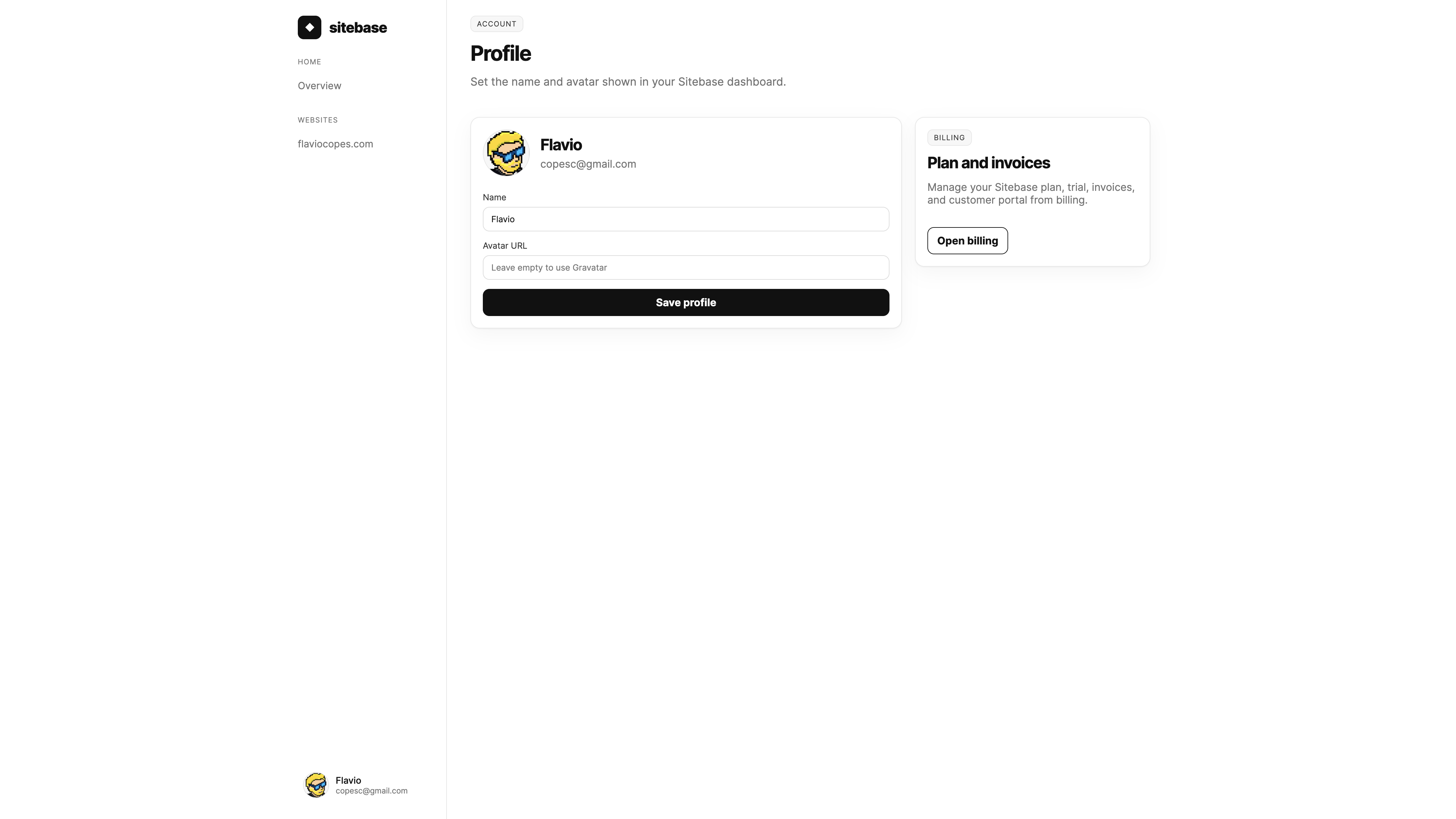
By default your avatar comes from Gravatar, matched to your email address. Prefer a different image? Paste any image URL in the Avatar URL field. Leave it empty to go back to Gravatar.
Plans
The billing page shows your current plan and the available ones.
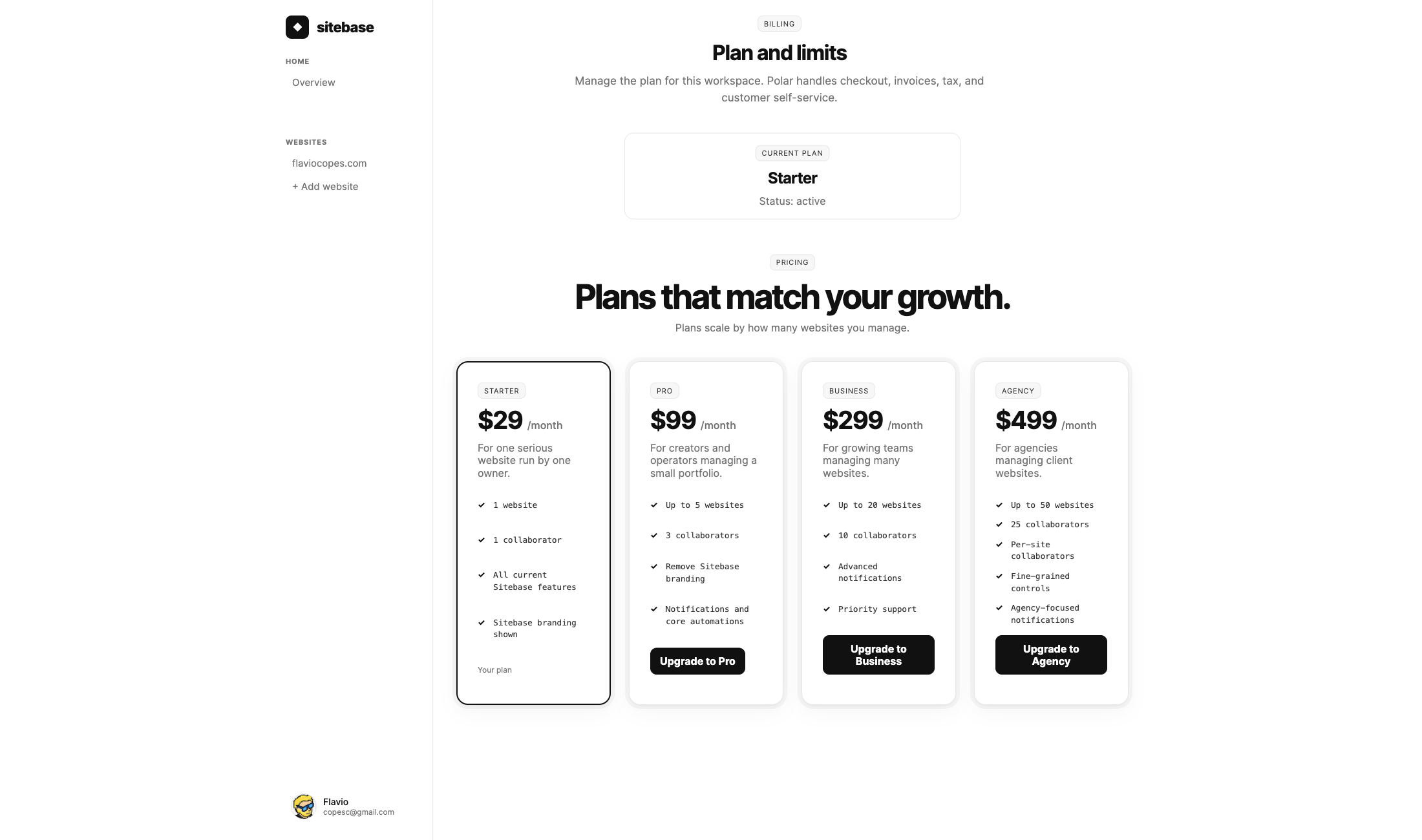
Sitebase is in private beta, so new signups come from the waiting list. Every plan includes every current feature:
- Starter — 1 website, no collaborators, all features, Sitebase branding on forms, 6 months of analytics history.
- Pro — up to 5 websites, 3 collaborators, branding removal, unlimited analytics history.
- Business — up to 20 websites, 10 collaborators, advanced notifications, unlimited analytics history.
- Agency — up to 50 websites, 10 collaborators per website, fine-grained controls, agency-focused notifications, unlimited analytics history.
- Enterprise is custom: individual teams within your organization, tailored website and collaborator limits, fine-grained controls, dedicated support, and procurement-friendly billing — email hello@sitebase.dev.
Early customers lock in a lower price that stays as long as they remain subscribed. While Sitebase is in private beta there is no public pricing page — current prices show on the billing page once you have access. Yearly billing charges once per year and gives you 2 months free.
Data region
After your first checkout, Sitebase asks you to choose a data region — the physical location of your database. Six regions are available (US West, US East, Western Europe, Eastern Europe, Asia Pacific, Oceania), and the nearest one is preselected. This choice is permanent and cannot be changed after setup.
Checkout, upgrades, and invoices
Payments run through Polar. Pick a plan on the billing page, choose monthly or yearly billing, and the checkout opens on Polar. You can switch at any time: moving between Starter, Pro, Business, and Agency happens right from the plan cards, and the price difference is prorated. Enterprise plans are sales-led — email hello@sitebase.dev to discuss custom limits.
Plan switches charge the current open price tier, the same rate any new customer would get at that moment.
Invoices, tax, payment methods, and cancellations are handled in Polar's customer portal, which you reach from the billing page once you have a subscription.
Cancelling
Cancellation goes through the Polar customer portal. When you cancel, your plan stays active until the end of the current billing period — you keep full access until then. After the period ends, dashboard access is removed (you'll be logged out), but nothing is deleted: your workspace, websites, subscribers, submissions, and all data stay safe.
If you change your mind, email hello@sitebase.dev and we'll reactivate your existing account with all data intact.
Logging in
Log in with the same email used at checkout or the email that accepted a collaborator invite. Sitebase only sends magic links to users attached to an active account; unknown emails show Email not found and link to the waiting list. Cancelled accounts show a notice that data is safe and how to get back in.
Logging out
Open the account menu at the bottom of the sidebar and click Log out.
Your data
The Profile page has a "Your data" card where you can export all your account data as JSON. If you need to delete your account entirely, use the "Danger zone" section — this cancels your subscription, removes your workspace and websites, and deletes your tenant database. The action is irreversible, so Sitebase asks for confirmation.
For your visitors' data: each website has a Privacy page (under Utilities in the sidebar) where you can search for a visitor by email, view their submissions and subscriptions, download a JSON export, or erase their data — useful for handling GDPR or CCPA requests from the people who fill out your forms.